Take-It
The objective of this module is to explain what goes into making what is called a "high-value" picture which is in demand by others to use in their media projects.
The objective of this module is to explain what goes into making what is called a "high-value" picture which is in demand by others to use in their media projects.
According to a recent survey by Pew Research Center (March 2013) 78% of all teenagers 12 years and older have cell phones with 47% of those teens having smartphones. Virtually all modern cell phones have integrated digital cameras with most teens using their cell phone as their primary camera.
This makes photos a very easy media type for students to “Give Back” and share with others.
The most common photo format produced by digital and cell phone cameras is defined by the Joint Photographic Experts Group (JPEG). This is a compressed format with over 16 million colors. Photos which have the JPEG format can be easily identified because their file names end with the extension “.jpg”. These .jpg files actually contain two distinct pieces of information; the information which makes up the photo image itself, and the metadata which provides additional information about file and photo like when it was taken, its size, the type of camera used, the resolution and user defined information.
Camera Metadata: When digital cameras take pictures, information about the camera and it’s settings get stored in the JPEG file. Many cell phones contain both digital cameras and global positioning systems (GPS) so they are also able to store GPS location information in the camera metadata. The standard which defines the format for digital camera metadata was developed by the Japanese Electronics Industry Development Association (JEIDA), and is called the Exchangeable Image format (EXIF).
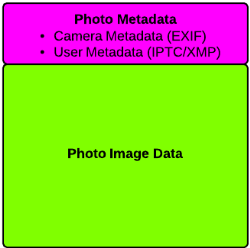 User Metadata: After a digital picture has been taken and saved as a .jpg file a user is able to edit certain pre-defined areas of the file to add unique information called user metadata. This information can include title, description, rating, keywords, and copyright information. Currently there are two different industry standards which define the format of this user metadata. An older standard was developed in the 1970s by the International Press Telecommunications Council (IPTC) primarily for the interchange of press photos between news organizations. A newer standard was developed in 2001 by Adobe and is called the eXtensible Metadata Platform (XMP). XMP is an open-source, public standard, making it easier for developers to adopt the specification in third-party software. Adobe worked with the IPTC to assure that both user metadata standards are compatible. Both Microsoft and Apple have added the ability to edit the user metadata of image files into their current operating systems through standard integrated applications.
There is a very nice online tool called “Jeffrey's Exif Viewer (http://regex.info/exif.cgi)” that allows you to read both the EXIF and XMP information from your photo.
The resolution of a photo is determined in two ways, first by the number of pixels or dots of information that make it up the photo (i.e. 20 x 20 px) , and second the number of dots per Inch (DPI) that are used to display it either in print or on the screen (i.e. 9 DPI).
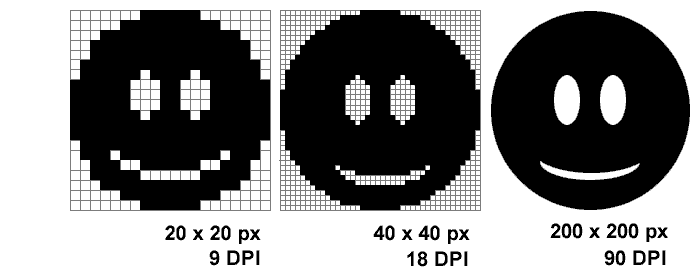
As you can see by the example, a photo with a large number of pixels and DPI appears high resolution, while a photo with a small number of pixels and DPI appears low resolution when displayed on the same size background. The number of pixels determines the file size of a photo, with a large number of pixels resulting in a large file size. DPI has no effect on file size, or how it appears when displayed. For print we want photos with a large number of pixels to provide a high quality appearance. For the internet we want adequate appearance with the smallest number of pixels since large files take a long time to load and effect performance. In addition computer monitors have a much smaller DPI than printers and do not need a large number of pixels to display a photo properly. Because of this the recommended size for the internet is 72 DPI, and the recommended size for print is 300 DPI.
| Display Device | Canvas Size | Output Resolution |
|---|---|---|
| 17” LCD Monitor | 1280 x 1024 px | 96 DPI |
| iPod Touch G1-3 | 480 x 320 px | 163 DPI |
| iPad 4 | 2048 x 1536 px | 264 DPI |
| iPhone 5 | 1136 x 640 px | 326 DPI |
| 4x6" Photograph | 1200 x 1800 px | 300 DPI |
| 11"x17" Poster | 2200 x 3400 px | 200 DPI |
All modern cell phone and digital cameras have the ability to take photos with a large number of pixels. This allows these photos to be printed and displayed in very high resolution. The down side is that these photo files are very large and need to be reduced for posting on the internet. There is a class of tools specifically for doing this called Image Optimizers. They come as programs which install locally on your computer, or Web 2.0 versions are available online. One example of an online tool is called “Image Optimizer (http://tools.dynamicdrive.com/imageoptimizer/)” which allows you to take a high resolution digital photo and automatically optimize it for use on the web.
Market research tracks the types of photos which are in high demand on stock photo web sites. Stock photos are professional photographs that are bought and sold on a royalty-free basis and are used and reused in creative assignments in commercial design. From that list a subset has been created which applies to the interests and availability for student photography
In addition there are some things that students should not take pictures to eliminate concerns with permission and copyright issues. These include:
Advancements in technology have enabled the rapid shift from film to digital photography and a vast reduction in the cost of taking and displaying a photo. This paired with the integration of sophisticated image editing software into all the major operating systems has seen a flood of photos throughout our society.
This means that in order for our photos to “stand out” they must provide a new perspective and distinctive point of view of something which has been seen many times before. This can be accomplished in a number of different ways, but primarily by not shooting our photos centered and straight ahead. Students must remember that “image means imagination” and they must use theirs to take photos which provide a different and unique perspective.
The physical position, lighting, and environment from which we take a photo can help to change the perspective including some of the following:
The “rule of thirds” is the main technique in photo composition which stems from the theory that the human eye naturally gravitates to intersection points that occur when an image is split into thirds. If a photo is divided into thirds with two imaginary lines vertically and two lines horizontally making three columns, three rows, and nine sections in the photo. The important compositional elements and leading lines are placed on or near the imaginary lines and where the lines intersect.